If you're planning a trip to Tokyo Disneyland or Tokyo DisneySea, getting familiar with the official Tokyo Disney Resort app is an absolute must.
These days, the parks are very much app-based. Paper maps are rarely handed out, and everything from securing access to popular attractions to ordering food can be done right from your phone. If you've visited Disney parks overseas, the system may feel somewhat familiar—but the Tokyo Disney Resort app is surprisingly powerful.
Just one warning: it may be a magical app, but even Disney magic can't stop your phone battery from draining! 😂
In this guide, I'll walk you through everything international visitors need to know—from setting up the app before your trip to useful in-park tips that can make your day at Tokyo Disney Resort much smoother.
1. Before Your Trip: Download the App, Set Your Language & Get Your Tickets Ready
The last thing you want is to arrive at the park and realize you still need to figure everything out.
Take care of these steps before you travel.
Downloading the App & Setting the Language
Download the Tokyo Disney Resort App
Search for “Tokyo Disney Resort App” on the App Store or Google Play and install it before your trip.
Language Settings
One thing that may surprise international visitors: there isn't a language switch inside the app itself.
If your smartphone's system language is set to English, the Tokyo Disney Resort app will automatically display in English.
Create a Disney Account
You'll need a Disney Account to use the app.
If you already have a Disney Account from another Disney destination, such as Walt Disney World or Disneyland Resort, you may be able to use the same account to log in. However, depending on your account and circumstances, you may be asked to log in again.
Our tip: Try logging in before your trip so you don't have to troubleshoot your account while standing outside the park gates.
Buy Your Park Tickets & Link Them to the App
You can purchase Tokyo Disney Resort tickets directly through the official website/app or through authorized ticket sellers such as Klook.
A note about overseas credit cards
Some international visitors have trouble completing payment with an overseas-issued credit card on the official Tokyo Disney Resort website.
If your payment keeps getting declined, try contacting your card issuer or purchasing your tickets through an authorized reseller such as Klook.
Add your tickets to the app
Once you've purchased your tickets, load the QR codes into the app.
Having everyone's tickets ready on your phone makes entering the park much easier.
You'll need to scan the QR code at the park entrance, so make sure you can easily access it before you reach the gate.
I'll cover the entrance process and some useful arrival tips in a separate guide.
Types of Park Tickets
Tokyo Disney Resort offers several types of admission tickets, including:
1-Day Passport
The standard full-day ticket, allowing you to enjoy the park throughout the day from opening.
College Passport — Seasonal/Promotional
When this special ticket is offered, eligible university, graduate school, junior college, vocational school, and preparatory school students from overseas may use it by presenting a valid Student ID on the day of their visit.
Keep your Student ID with you—you may be asked to show it at the park.
Early Evening Passport
This ticket allows admission from 3:00 p.m. on weekends and holidays.
It can be a useful option if you don't need a full day in the parks.
1-Day Passport for Guests with Disabilities
Guests who have an officially recognized disability certificate or equivalent documentation issued overseas may be eligible if they have the required documentation.
If you're visiting from overseas, check the current requirements in advance. English-language documentation may be required when presenting your eligibility at the park.
2. The First Things to Do After Entering: DPA, Priority Pass & Your Group
You've made it through the gates—now the real fun begins!
Once you've entered the park, open the Tokyo Disney Resort app and take care of these important steps as soon as possible.
Disney Premier Access (DPA)
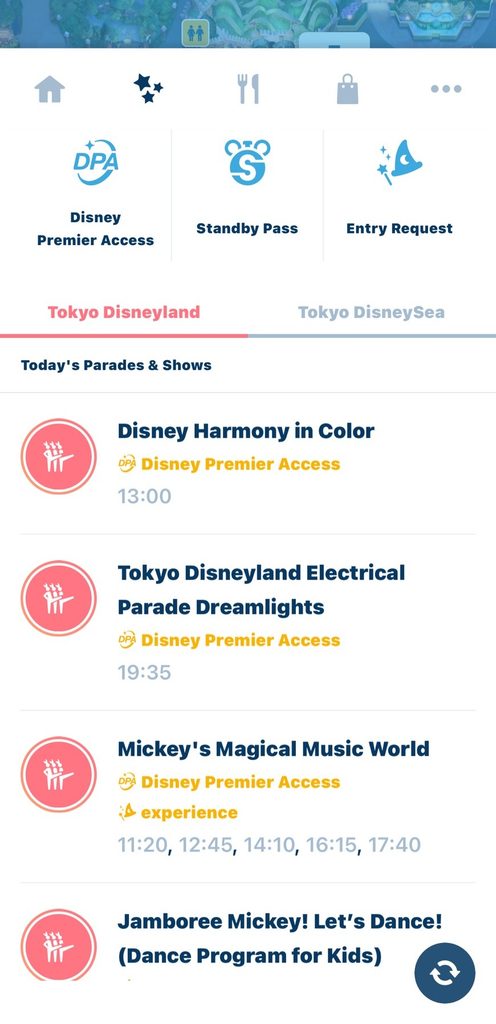
Disney Premier Access (DPA) is Tokyo Disney Resort's paid skip-the-line option for selected popular attractions and entertainment.
As of September 2026, prices are approximately ¥1,000–¥3,500 per experience, depending on the attraction or entertainment offering.
How to purchase DPA
After entering the park:
- Open the Tokyo Disney Resort app.
- Select Disney Premier Access.
- Choose the attraction or entertainment.
- Select an available time.
- Complete your purchase.
Availability is limited, and popular experiences can sell out quickly.
If there's a must-do attraction or show on your list, don't wait until later in the day to check.
Priority Pass & Standby Pass
Tokyo Disney Resort also offers Priority Pass, a free way to access selected attractions with a designated return time.(Note: Priority Pass is currently not being issued.)
The park may also use Standby Pass, a free digital system that can control access to certain shops or experiences when needed.
Important: Standby Pass is not currently being issued as of September 2026, but this can change depending on park operations.
There are also rules governing when you can obtain your next pass, so always check the app for the exact time you're eligible to make another selection.
Create a Group
Traveling with family or friends?
Use the app's Group feature to connect your party and manage everyone's tickets in one place.
This is especially helpful for families.
Once your group is set up, one person's phone can be used to manage things such as DPA and Priority Pass for the whole party, rather than everyone having to do it separately.
For families with kids, this can save a surprising amount of time—and a lot of phone juggling!
3. Finding Attractions & Checking Wait Times
Tokyo Disney Resort is much easier to navigate when you make friends with the map.
Use the Live Park Map
The app's interactive map shows real-time wait times for attractions.
For example:
“45 min” means the current estimated standby wait is around 45 minutes.
Turn on your phone's location services and the map can also show your current location, making it much easier to find your way around the park.
This is especially useful at DisneySea, where the park's layout can take a little getting used to for first-time visitors.
Family-Friendly Filters
Traveling with younger kids?
The map's filters allow you to narrow down attractions based on features such as “No height restrictions” and family-friendly options.
It's a great way to quickly find attractions everyone in your party can enjoy.
4. Restaurants & Shopping: Save Time for the Fun Stuff
Nobody wants to spend half their Disney day standing in line for lunch.
The app has several features that can help.
Disney Mobile Order
Disney Mobile Order lets you order and pay for food through the app without waiting in the restaurant's ordering line.
Simply:
- Choose a participating restaurant.
- Select your food.
- Choose an available pickup time.
- Place your order.
- Go to the restaurant during your selected window.
- Pick up your meal at the designated counter.
It's especially useful during the busy lunch period.
Instead of spending your precious park time waiting in a food queue, you can use that time to enjoy another attraction, shop, or simply take a break.
Priority Seating for Restaurants
Some table-service restaurants offer Priority Seating, Tokyo Disney Resort's advance reservation system.
For same-day reservations, you can check availability through the app from 9:00 a.m.
Even if you didn't get a reservation in advance, it's worth checking the app for cancellations and newly released availability.
5. Essential Tips for International Visitors
There are two things I strongly recommend taking care of before your park day.
Bring a Portable Charger
Your phone is going to work hard at Tokyo Disney Resort.
You'll be using it for:
- DPA
- Priority Pass
- Checking wait times
- Park maps
- Mobile Order
- Your tickets
- Photos and videos
That can drain your battery surprisingly fast.
Bring a portable power bank.
Forgot yours?
Tokyo Disney Resort has ChargeSPOT rental stations where you can rent a portable battery.
However, you'll need the appropriate app and payment setup to use the service, so don't rely on it as your only backup.
Don't Rely on Free Wi-Fi
This is an important one for international visitors.
Free Wi-Fi at the parks is available only in limited areas, mainly around the entrances. You generally shouldn't expect reliable Wi-Fi while you're walking around the park or waiting in an attraction queue.
What should you do?
Before leaving your hotel, make sure you have reliable mobile data.
For visitors from overseas, options include:
- eSIM: We recommend JAPAN & GLOBAL eSIM — you can set it up instantly with a QR code before your trip, starting from just ¥250.
- Pocket Wi-Fi:Japan SoftBank Pocket Wi-Fi — Great for groups or multiple devices with unlimited data!
- An international roaming plan from your home carrier
Having a stable data connection throughout the park makes a huge difference, especially when you're trying to grab a DPA, check a wait time, or place a Mobile Order.
6. Your Tokyo Disney Resort App Cheat Sheet
The Tokyo Disney Resort app may look a little overwhelming at first, but once you understand the basics, it becomes one of the most useful tools you'll have in the parks.
Here's the basic flow to remember:
Before your trip
Download the app → Create/sign in to your Disney Account → Buy your tickets → Add your tickets to the app
As soon as you enter
Create your Group → Check DPA → Check Priority Pass
Throughout the day
Check wait times → Use the live map → Place Mobile Orders → Keep an eye on your battery
That's it!
Once you've got these basics down, you can spend less time figuring out the app and more time enjoying the magic of Tokyo Disneyland and Tokyo DisneySea.
So charge your phone, get your tickets ready, and get ready for a very Disney day! ✨